Home » Lesson Plans

Category: Lesson Plans

Create a 3D Printed Keychain without any 3D Printing Experience [ep. 220]

Create a 3D Printed Keychain without any 3D Printing Experience [ep. 220]

Check out the full episode on creating a 3D printed keychain:  


Subscribe to the podcast HERE on your favorite podcasting platform.

Episode Summary

Want to try 3D printing with your students but aren’t sure where to start? I’m sharing a fun, beginner-friendly 3D printing project that students can complete in just two class sessions—no previous 3D printing experience needed!

I’ll walk you through how my students created their own Halloween-inspired 3D printed keychains using Doodle 3D Transform, a free, easy-to-use design tool that doesn’t require student accounts or logins. From drawing their designs to exporting files, organizing student prints, and decorating the finished keychains, I’m sharing the entire process along with tips I’ve learned from teaching this project myself.

Whether you’re brand new to 3D printing, looking for an easy project for younger students, or want a quick seasonal STEM activity, this lesson is a great way to get students designing and creating!

Resources Mentioned:

Some items are linked to my Amazon Affiliate. When you purchase through my link, no extra cost to you, and I may receive a small commission in return.

Episode Transcript: 

Welcome to the Elementary STEM Coach Podcast. I’m your host, Naomi Meredith, a former classroom teacher turned K-5 STEM teacher and coach. With over a decade of experience teaching and a master’s degree in STEM leadership, I’m here to coach you throughout the year to help you gain back more time to create innovative experiences for your students.

If you’re looking for a quick 3D printing project that your students can do in about two days without any 3D printing experience, this episode is perfect for you. Likewise, if you are a teacher who’s also wanting to start 3D printing in your classroom and you’re unsure how to get started, this is an easy, low entry point 3D printing project where even you as the teacher, you don’t need a ton of experience as well. I’m going to be sharing with you a project that I am currently doing with my students.

They’re going to get their prints back next week if you’re listening to this in real time and I think you’re really going to enjoy this episode. This entire lesson, I will have linked in the show notes for you. So, I created worksheets, videos, examples, everything you need, the teaching slides, it’s all there for you.

So, you don’t have to go out and search for it. I literally made it for you and for the kids. I use it with my own students.

So, that will be linked and get you well on your way. When I’m designing 3D prints, I am a huge advocate for using Tinkercad in the classroom. I’ve been using that since 2018 with my students, but I actually don’t use Tinkercad for this project.

Instead, I use the free website. It is called Doodle 3D Transform. It’s a free open source website, so there’s no logging in, no accounts you need to create, which also saves time to begin with, and there also is a paid app for the iPads, which it works slightly better.

It doesn’t zoom in and out and get a little crazy, which can happen when you use this app. So, if you have a little bit of money, I would recommend if you have only tablets, try buying the app. It just works slightly better, but if you can’t, this is what I did, is you can just create a QR code of the website and then kids can scan it and use it on the iPads and just tell them just to be really careful.

The screen will zoom in and you can’t zoom it out and then have to restart their project, so just be aware of that. This project, I did it in line with Halloween. I had them get to this website.

You could draw in Tinkercad if you really want to. It’s just that the tools are a bit limited when it comes to drawing specifically. So, what it looks like on this app, it’s one page.

They don’t have to click around. It’s so easy to get started. It’s really fun.

Where on the left side, they draw their design using their finger. There are a few tools at the bottom. There’s a select tool.

You could select the whole project and move it around. There’s the drawing tool, so it gives you some options. There’s a pencil, a line tool, so just drawing perfect straight lines, and a paintbrush.

I recommend using the paintbrush. That one draws and prints the best. The pencil’s a little weird with the printing.

I’ve tried it. It just breaks apart. It’s strange, so definitely use the paintbrush.

There’s an eraser. There’s a few stamps with basic shapes. You can also change the colors, too.

If you have a 3D printer that can print in multiple colors, which I do, kids can create using colors, and you can download as an OBJ file where it will save all the color options. So, that’s a whole project. I’m not talking about that in this episode.

I let them draw in multiple colors, but I told them I’m only printing this in white, and since it’s for Halloween, my white glows in the dark. So, I’ll also link that for you, and what I did is I printed out different Halloween how-to-draw examples that I made, so I made them for kids. There’s 10 different options as inspiration or support because they are drawing their design, and I didn’t want kids to feel intimidated that they were drawing and saying, I don’t know how to draw anything.

Well, I created step-by-step kid-friendly directions for you. So, these are one-page printables that are in that lesson that I talked about. I wasn’t very strict on it being Halloween.

Most of them did Halloween. Some did not, which is totally fine. Again, whatever vibes you’re going for.

I’m planning on creating other themes, Halloween’s where we’re at right now. The kids draw directly in the app. One quick thing before you download all their prints is either you have the students or you do it, but you need to create some sort of hook on the keychain.

I went through and did this while I was saving. I just added the little hook, and my video in the lesson shows you exactly how I do this because punching holes through a 3D print when after it’s printed is really difficult. It could break your print.

It might not be where you want it. So, I show you exactly how to do this in the video. And for this specific project, I downloaded or exported the files as STL files and sent them to my computer.

This is probably the hardest part, and you need to be very, very organized to do this. So, because there isn’t a login for this, I save it in two ways. So, I made the kids give me their iPads when they were done, and I actually had a share iPad.

So, there’s an option to save it directly in the app and or the specific web browser. Definitely play around your devices and how you want to save it before you do this with kids. So, try it on a device by yourself first.

Figure out how you’re going to get the files off of your device, and you’ll totally be fine. The iPads that I was borrowing didn’t have Google Drive downloaded on it, didn’t have AirDrop enabled. So, I wish I checked before because I sat there for 45 minutes after my club, and I had to log into my Gmail account on every single iPad and email myself those files.

But I didn’t know how else to get them off. I didn’t have access to download any apps. So, just figure it out.

AirDrop is fantastic if you can do that. Once I have all their files downloaded, I save them in a folder on my desktop with the name of the class. I also have a free 3D printing station that literally goes through how you can organize all your prints.

I’m not going to get into that right now, but I have pictures and everything in that freebie I’ll link below and how I get all of that organized for the kids. Once you get everything organized with your files and you get these printed, they’re going to print really fast and you probably can get a whole class done in two to three rounds and be done. The cool thing about creating things in Doodle 3D Transform is all of the prints are flat.

So, yes, you have all these cute little designs like a little ghost or pumpkin. It has all the curves, but everything’s going to be the same height and print quickly because you don’t need to print with supports. Nothing hangs off the edges.

It prints really nice and it’s really, really fast, which you could get if you started today. Tomorrow, the next day, you could get this done by Halloween. Once the prints are all done, you have them organized.

You know who’s is who. You put each kid’s print in a bag with their name on it. That’s what I do.

Then I provide them a bunch of different paint markers, which I’ll link the brand I’ve been rebuying every year below, and I let the kids just decorate their cutie little keychains. If you are doing glow-in-the-dark, I recommend just coloring one side, which also helps with them drying a little bit faster because the glow will kind of come through, but it’s best if you just keep one side empty. You can attach that cute little keychain and you’re good to go.

They did a project and they’re excited. They’re proud of it. They made it on a device and it’s a good stepping stone into Tinkercad or just a quick project.

You’re using your printers and again, this is really great, especially for the primary students where they really want to design their own 3D prints. They’re not ready for Tinkercad yet and you’re helping them understand the process of what 3D printing is, how to get started, how to be the creator, how to create without using AI. They’re using their own brains.

They’re using their own drawings and they turn out really, really cute. Again, everything’s going to be linked for you in the show notes below and if you’re not already following me on Instagram at Naomi Meredith underscore, I share lots of examples about 3D printing, what I’m doing and questions that you have. I try to answer those in post, so let me know what you think.

Tag me if you do this project and also keep an eye out for other holiday themes because if you’re not ready to do this for Halloween, I’m going to create themes for all the other holidays. I’m a theme person, so you know I will. Thanks for being here and I will chat with you soon.

Thank you so much for listening to today’s episode of the Elementary STEM Coach Podcast. I would love to connect with you over on Instagram at Naomi Meredith underscore or send me an email to elementarystemcoachpodcast at gmail.com. Also, make sure to check out my website Naomi Meredith dot com to see all the show notes from today’s episode and shop my K-5 STEM resources. Any questions you have, needs for resources or ideas for episodes, get in touch.


Related Episodes/Blog Posts:

Connect with Naomi Meredith:


More About your host, Naomi Meredith

Naomi Meredith is a K-5 STEM educator and business owner in Colorado supporting elementary teachers world-wide navigate the best practices, strategies and tools out there. With over a decade of experience teaching, 5 years teaching elementary STEM, along with a M.Ed. in STEM Leadership and STEM Certificate, Naomi helps teachers world-wide to navigate best practices, strategies and tools out there.

She offers a variety of tools to help teachers feel successful teaching STEM to their elementary students through lesson plans, online courses, coaching and speaking events.

She truly believes that any teacher out there can learn how to use STEM, innovation and hands-on learning in their classrooms effectively. She can’t wait to connect with you and be your guide!

More About The Elementary STEM Coach Podcast

Are you tired of scrolling online for your next great STEM lesson? Do you feel like there is no time to plan, research and test meaningful STEM lessons, so you throw together a hands-on activity and hope that it works? What systems and routines should you set in place to help students be creative, critically think, and collaborate? 

The Elementary STEM Coach is a podcast for K-5 STEM teachers, classroom teachers, GT specialists, and homeschool parents looking for actionable STEM solutions. Each week, Naomi Meredith will share tools, resources and lesson ideas that are actionable in your classroom and create highly engaging experiences with your students. You’ll learn systems and routines that will create control in the chaos and that will keep you organized all year long. 

Your mindless scrolling days are over! Your new STEM-best friend is now here in your ear buds!

3 Glow-in-the-dark STEM Activities to Try [ep.219]

3 Glow-in-the-Dark STEM Activities to Try [ep.219]

Check out the full episode on glow-in-the-dark STEM activities:  


Subscribe to the podcast HERE on your favorite podcasting platform.

Episode Summary

Add a little glow to your spooky STEM lessons this Halloween season! In this episode, I’m sharing three fun, hands-on STEM activities that glow in the dark and are perfect for bringing a little extra excitement into your K-5 classroom.

From building a glowing spooky house using just paper to experimenting with glow-in-the-dark slime and designing 3D-printed Halloween keychains. Plus, I’ll share classroom tips, materials, and ways to make these projects easy to prep and teach.

Resources Mentioned:

Episode Transcript: 

Welcome to the Elementary STEM Coach Podcast. I’m your host, Naomi Meredith, a former classroom teacher turned Paper 5 STEM teacher and coach. With over a decade of experience teaching and a master’s degree in STEM leadership, I’m here to coach you throughout the year to help you gain back more time to create innovative experiences for your students.


In today’s episode, I’m going to be sharing with you some fun spooky STEM lessons that are things that glow. There’s just something about that glowing touch to the projects that make the projects a little bit more exciting, especially during this time of year when the days are starting to get shorter, it’s getting dark earlier. So I think it’s going to add that fun little spooky element in your class.


If you haven’t already grabbed it, and it’s also linked in the show notes for this episode, I put together a whole guide, 15 plus spooky STEM lessons that you can download for free. And it’s a bunch of different lesson ideas that you can use for your classroom that are also glowing, but also just some fun, spooky themes. And each of the words and pictures you can click on, and it will take you to more information about that lesson.


So it’s best viewed on a computer, you can view on your phone, definitely recommend to view that on a computer. So make sure to check that out. The first glowing STEM lesson that your kids are definitely going to love is to build a spooky house.


This requires minimal materials, super easy to prep, all you need is the free spooky house template that I put together for you. And with that, there is a video that I recorded of me building and explaining this little house. It’s a lot of cutting and folding.


Again, it’s one sheet of paper for one house. But it’s really good for kids to practice those skills and also to take their time and to be precise. And if they do those things, it will be put together very easily.


It’s very similar to building a paper dice, if you’ve ever done that with kids. And some of my other lessons actually have building a paper dice in there, like my Goldilocks digital citizenship lesson that is about private and personal information. This is really fun, where they build this cute little spooky house, they can decorate it if you want.


And then if you have those small LED battery tea lights, you can put that inside. And if they hold it on a paper plate, it’ll hold the light in the house. It glows really, really cool.


If you follow me on Instagram, I actually have a video of this in action. But this is a great one day lesson. Again, works on that precision and cutting and taping skills, which we know are needed even outside of a STEM classroom.


But this is a fun little spooky lesson that my students definitely enjoyed. The next glowing STEM lesson is so much fun. And you can do this during spooky season.


And or if you’re planning on having a glow day, which is when I actually taught this lesson, is creating glow in the dark slime. And it sounds a little bit intimidating. But trust me, the recipe that I put together, and I wrote it in smaller proportions, where you don’t need a whole lot of materials to create the slime, it’s just enough where the kids can independently pour the ingredients, measure those out and put it together.


And what makes this slime glow is the glue. This isn’t sponsored, but Elmer’s actually makes a glowing glue, a glowing liquid glue. There’s a few different colors.


I particularly enjoyed the blue one, and it has some sparkle too. But it’s really, really fun to create this slime. And again, it glows.


You don’t need a black light. When I did a glow party, and I could do a whole episode on a glow party, I can go back and see the pictures that I took of that time. You just want to make sure that the bottle of glue, the glowing glue, gets some sunlight, some natural light before you create it.


And then if you go into a dark space, it will glow right away. When I was testing my slime, when I was recording the video for this, I forgot that my nails actually glow as well. So I have some cute little spooky nails.


And so I’m taking a video of this, and not only is the slime glowing, not only is this slime glowing, but my nails were as well, which was pretty funny. That’s a fun activity. And you can go deeper into this with the worksheets I have for it, where you talk about the three states of matter and how slime is actually non-Newtonian fluid and has properties of solids and liquids.


So there’s actually a testing sheet that you could go through that process and really understand what properties of the slime prove that it’s a non-Newtonian fluid. So it’s pretty cool. And the last glowing STEM activity, which you don’t have to make this glow, but I recommend it, is creating 3D printed Halloween keychains.


This is a lesson that I’m actually putting together, so it might even be live by the time you hear this recording or even a few days from now. So just keep making sure you check back in the show notes. You can easily create little keychains that glow, and there’s 3D print filament.


There’s a few brands that I’ve used that glow in the dark. Now, side note, I’m going to tell you how to make those keychains, but when you are printing these, when you’re 3D printing these keychains, you probably want to play around with the settings, because for some reason, glow in the dark filament is a little bit finicky in terms of printing and how it will feed through the extruder. The two that I’ve used have worked okay, depending on what printer I’ve used.


So play around with it. They do actually glow. Like, I’m actually shocked.


I’ve tested the actual filament before even taking it out of the package to make sure it glows, and it does. You could do this a few ways, where the one filament I’m currently printing, actually a different project, Constellations, for my students, the filament is white. So what is really cool is you can have the kids draw and design their keychain.


I recommend, if you want to do this quickly, you can use the free platform Doodle 3D Transform. There’s an app for it, but also it’s an open source website where kids can just draw their design. They don’t need to log in.


Tinkercad has a drawing feature, which is okay, if you prefer. I love Tinkercad. Their drawing feature is not great, but you can still use it.


And you can have students draw their Halloween keychain. So maybe a cute little ghost, a cute little pumpkin, and print them all in this white glowing filament. So they will glow regardless.


And then, if you have some paint markers, which I always have those on stock with my 3D printing club, the kids can actually color in the little designs they want on their keychain. That way, your prints are actually going to print a lot quicker. You can do a lot more at once because you’re only using one color.


You could probably get everybody’s prints done in like a day or two because they’re going to be flat. That’s why with Doodle 3D Transform, it’s really great because they’re a flat design. There’s not a lot sticking out.


So they print really well. And then you can have these cute little keychains for your student. If you’re wondering how to add the hole, what you would do is there’s an eraser in that platform.


You just like kind of, and you might want to do this as the teacher depending on the age of your students, but tap in a little spot where you want a hole. So it erases it. You could see the work plane behind it.


You could even draw like a little tab onto the keychain and then add a hole there if it doesn’t make sense in the designs. That is something I’m going to put together in a video. That’s my next on my list.


If you are pretty comfortable with those platforms, you’re like, all right, I’m good. Go for it. I think they’ll be really cute.


The ones I’m going to make for samples, I’m going to end up giving to my nephews because I’m going to trick or treat with them. So I hope you enjoy all these glowing spooky STEM ideas. And again, make sure to check out that free printable I put together for you where you can see these ideas and more to bring the spookiness into your STEM space.


Thank you so much for listening to today’s episode of the Elementary STEM Coach Podcast. I would love to connect with you over on Instagram at Naomi Meredith underscore, or send me an email to elementarystemcoachpodcast at gmail.com. Also make sure to check out my website, naomimeritus.com to see all the show notes from today’s episode and shop my K-5 STEM resources. Any questions you have, needs for resources or ideas for episodes, get in touch.


I’ll talk to you soon.

Transcribed by TurboScribe. Go Unlimited to remove this message.


Related Episodes/Blog Posts:

Connect with Naomi Meredith:


More About your host, Naomi Meredith

Naomi Meredith is a K-5 STEM educator and business owner in Colorado supporting elementary teachers world-wide navigate the best practices, strategies and tools out there. With over a decade of experience teaching, 5 years teaching elementary STEM, along with a M.Ed. in STEM Leadership and STEM Certificate, Naomi helps teachers world-wide to navigate best practices, strategies and tools out there.

She offers a variety of tools to help teachers feel successful teaching STEM to their elementary students through lesson plans, online courses, coaching and speaking events.

She truly believes that any teacher out there can learn how to use STEM, innovation and hands-on learning in their classrooms effectively. She can’t wait to connect with you and be your guide!

More About The Elementary STEM Coach Podcast

Are you tired of scrolling online for your next great STEM lesson? Do you feel like there is no time to plan, research and test meaningful STEM lessons, so you throw together a hands-on activity and hope that it works? What systems and routines should you set in place to help students be creative, critically think, and collaborate? 

The Elementary STEM Coach is a podcast for K-5 STEM teachers, classroom teachers, GT specialists, and homeschool parents looking for actionable STEM solutions. Each week, Naomi Meredith will share tools, resources and lesson ideas that are actionable in your classroom and create highly engaging experiences with your students. You’ll learn systems and routines that will create control in the chaos and that will keep you organized all year long. 

Your mindless scrolling days are over! Your new STEM-best friend is now here in your ear buds!

5 October STEM Activities for Kids [ep.218]

5 October STEM Activities for Kids [ep.218]

Check out the full episode on October STEM Activities for Kids:  


Subscribe to the podcast HERE on your favorite podcasting platform.

Episode Summary

I love themed STEM lessons, and I know you and your students will enjoy these October STEM activities. I put together a mix of robotics lessons, Makerspace, and even technology options to help bring Fall into your classroom. These five fall STEM activities to try are perfect for one-day lessons, sub plans, or even class parties, especially since they are low-prep challenges.

Resources Mentioned:

Episode Transcript: 

Naomi Meredith  00:27

If you haven’t learned this about me by now, I love a good theme. You heard all about how I themed out my first unit of the year back in episode four, Welcome to STEM Survival Camp. If you take a peek around my house, I have some fall decorations peeking in the corners on my tables. Of course, I have all of those fall-flavored candles. In turn, I don’t always teach themed lessons in my class. It can be really fun to integrate these within your lessons, especially if you need something quick that works for one day. If you really want to extend it throughout the week, all of these challenges will work perfectly for you and across many different grade levels. So let’s jump into these five ideas that you can implement in your STEM space.  


Naomi Meredith  01:40

The first fall STEM activity to try is apple and pumpkin lifecycle robotic coding. This is a great low prep challenge that you can use as a station, and students can learn all about the lifecycle of favorite harvest fruits like apples and pumpkins. You can do this challenge for anything, but these two are very popular during the fall season. All you need to do is have each stage of the lifecycle of the pumpkin or apple on different cards, and students will code in a variety of ways to help them learn more about those life cycles. So here are a few variations of this that you can use with the robots that you have in your classroom. This will work well with pretty much any type of robot that you have. The only one I think it might not work best with is Ozobots unless you have a special grid, you could definitely do this in a different way.  


Naomi Meredith  02:40

Speaking of grids, there are grids that you can purchase that are fancy for all of the robots. However, when you are on a budget like most of us, it is sometimes easier to create your own grid that the robots can move along is really helpful for students to visualize the steps that they need their robot to travel. Most robots for children have very specific movements when they are moving forward in one space. You can create your own mat by measuring the distance of one forward move for each robot. However, I have created a lot of these for all the smaller robots and RDS with all the measurements done for you. So you can just print, cut, glue, and create whatever size mat that you want. Of course, all of the challenges that I will be talking about and these gridlines will be linked in the show notes to save you some time with your fall theme planning.  


Naomi Meredith  03:35

So for this lifecycle coding, create a map or use one that you have on hand and have those cards that are about the lifecycle of that living thing. You can even have students be more involved in this creation process. They can create the cards that they will code for that specific lifecycle. Once all of these resources are created, here are variations that you can play with these cards. If you’re creating the grid ahead of time, you can laminate the different stages of the lifecycle of the pumpkin or apple. Students will code to those different locations on the grid. Another variation of this challenge is students can be in partnerships. Instead of having the cards laminated on the grid, they can be movable. One partner can place the cards on the grid-facing app, and the other partner will code the robot to gather all of the pieces in order of the lifecycle, and then they can switch. The third variation would be having that partner system, but then they have to code the lifecycle backward. The fourth variation is they can either go backward or forward, but instead of the grid-facing app, they can have them facing down, and it can be more like a memory game.  


Naomi Meredith  04:53

So there are a lot of different variations to this and with the age of your students and their coding experience. It’s fun for them to try these different challenges to practice their coding skills. The second fall STEM activity to try is creating one-page inspiration boards that follow along with any of the fall holidays you are discussing in your classroom. These could be things like the Day of the Dead, Thanksgiving, Halloween, or even for the whole month, such as what different things are typical for that month. For instance, for the month of September, October, and November, what are different items that people think of for that month? You can have different pictures on this one-page board that can inspire students to build, such as apples, pumpkins, baskets, you name it. You can have these visuals for students, and then they can build with any materials that you have on hand, whether it’d be items in your Makerspace or if you want to pull out LEGO bricks. I really like using this type of engineer inspiration board with my younger students, especially when a lesson might go quicker than expected. These are really great to have on hand that you can have printed at a station, or you can display on the projector or TV in your classroom.  


Naomi Meredith  06:14

The third fall STEM activity to try is creating a pumpkin bridge. Again, this can be a one-day challenge in your classroom, or, if you want to dive in deeper, you can extend this for the whole week and use the Engineering Design Process. If you are a bit unsure about what the Engineering Design Process is, fairly recently, I had a whole mini-series about the Engineering Design Process where I dove into every single stage of that process to give you ideas on how to teach this in your classroom. So make sure to go back and listen to those because that will help you extend your knowledge whether you use the Engineering Design Process already or looking to gain more knowledge about it. For this pumpkin bridge challenge, you can use any materials you have on hand. I like to use popsicle sticks, tape, and cups. Students will build one of the types of bridges that we talked about in class to hold as many pumpkins as possible. This is fine if you use the pumpkin candies that you can find at the store. You can also use unifix cubes as I have. I’ll tell the kids that the pumpkins are square because they came right out of Minecraft. There’s a whole lot of buy-in for that, and they don’t mind that the pumpkins are different colors. You could do a whole lot of math afterward, like how many pumpkins could it hold, and compare the different bridges in the classroom. You could measure how long the bridge was, how wide the bridge was, or how tall. So there’s a whole lot of math that you could do with this STEM challenge.  


Naomi Meredith  07:30

The fourth fall STEM activity to try is pumpkin digital activities. Now this one isn’t as hands-on, but it’s a great way to implement the T-technology within your classroom if you want something that is paperless and easy to assign. I have two different variations for the grades. So for K through two, I like to create a digital interactive activity that they can use on Seesaw or Google slides that are quick little tasks on each slide. These tasks are helpful for the students because they can practice their digital skills, such as dragging and dropping, drawing on the screen, and labeling a picture. All of those tech skills are important for any type of activity, not just pumpkins. You can create each slide that goes along with a theme, like pumpkins. They can do things like measuring a vine using digital unifix cubes. They can use the shape tools to decorate a picture of the pumpkin or even an alphabet match where students are dragging the letters to help them spell different words such as pumpkins. Having these slides with quick activities helps students be successful. They can work at their own pace and also help each other out when they get stuck. For the older students, you could do something similar, but I also like to give them digital interactive notebooks that help them explore other outside resources that are kid friendly. This is where I like to pull in other resources such as podcasts, videos, paired selections, and nonfiction and fiction texts, and they can respond within the digital interactive notebook. You could share just one slide a day. You could have it be differentiated where certain kids might have specific slides, or you can have it even open-ended, and kids pick the slides that are most interesting to them. So this is a great way to pull in those outside resources that you might have been collecting over the years and assign them to one digital platform.  


Naomi Meredith  08:01

The fifth fall-themed STEM activity to try is having students design a harvest basket. Now, this isn’t a lesson that I have in my store yet, maybe by the time this recording comes out, it will be in there. But this would be another fun challenge that you can use the Engineering Design Process or even do it in one day. You can have tiny pumpkins or tiny apples, or even pretend if you’re worried about them getting damaged, and students could use materials like straws, popsicle sticks, or string to create a harvest basket to hold as many of these fruits as possible. This will be a great collaboration challenge, and also learn different techniques when it comes to securing items and being able to hold weight. If you wanted to extend this challenge even further, you could have students weigh how many apples or how many pumpkins their basket was able to hold. Then you could compare the weights using greater than and less than place value, or even graphing, depending on the age of your students and the math standards that would tie into those.  


Naomi Meredith  09:04

This was a quick episode today, but just some fun fall STEM activities that you can try in your STEM space and bring the fall into your classroom. So let’s go over those five different activities that you can try. First is the apple and pumpkin lifecycle robotic coding. Next, our fall-themed engineer inspiration boards. Third, are pumpkin bridges. Fourth is pumpkin digital activities. And fifth is designing a harvest basket. I hope you enjoyed these fall-themed activities and definitely share with me what you have done in your classroom. I would love to see how it goes with your students. 


Related Episodes/Blog Posts:


Connect with Naomi Meredith:


More About your host, Naomi Meredith

Naomi Meredith is a K-5 STEM educator and business owner in Colorado supporting elementary teachers world-wide navigate the best practices, strategies and tools out there. With over a decade of experience teaching, 5 years teaching elementary STEM, along with a M.Ed. in STEM Leadership and STEM Certificate, Naomi helps teachers world-wide to navigate best practices, strategies and tools out there.

She offers a variety of tools to help teachers feel successful teaching STEM to their elementary students through lesson plans, online courses, coaching and speaking events.

She truly believes that any teacher out there can learn how to use STEM, innovation and hands-on learning in their classrooms effectively. She can’t wait to connect with you and be your guide!

More About The Elementary STEM Coach Podcast

Are you tired of scrolling online for your next great STEM lesson? Do you feel like there is no time to plan, research and test meaningful STEM lessons, so you throw together a hands-on activity and hope that it works? What systems and routines should you set in place to help students be creative, critically think, and collaborate? 

The Elementary STEM Coach is a podcast for K-5 STEM teachers, classroom teachers, GT specialists, and homeschool parents looking for actionable STEM solutions. Each week, Naomi Meredith will share tools, resources and lesson ideas that are actionable in your classroom and create highly engaging experiences with your students. You’ll learn systems and routines that will create control in the chaos and that will keep you organized all year long. 

Your mindless scrolling days are over! Your new STEM-best friend is now here in your ear buds!

Make a Bug Hotel from Recycled Materials

Make a Bug Hotel from Recycled Materials

Help the important pollinators in your area by building a bug hotel. This hands-on lesson will help kids learn more about insects, pollinators and decomposers and how helping these bugs are important by using these templates and worksheets to guide the activity. 

Materials Needed for this Bug Hotel STEM Project:

Materials links included inside my full resource here 

Some items are linked to my Amazon Affiliate account. When you purchase through my link, there is no added cost to you, but I receive a small commission in return.


Watch the video on how to make this Bug Hotel from Recycled Materials:


Let’s slow it down with step-by-step directions on how to make this bug hotel from recycled materials. For more detailed teaching instructions using the Engineering Design Process, you can get that here. 

Step 1:

Trace and cut two rectangle pieces of cardboard that fit inside your container.

Step 2:

Cut halfway down the middle of each piece of cardboard. Stack each piece by criss-crossing them in the slot to form a letter ‘X’

Step 3:

Place the cardboard ‘X’ inside the container.


Fill each side of the ‘X’ shape with recycled materials. Make sure to leave room for natural materials. Fold the cardboard tube to create sections.

Step 5:

Cut the straws in half and wrap them together in a bundle using a pipe cleaner.

Step 6:

Cut small rectangles out of thin cardboard and roll into cinnamon roll shapes.

Step 7:

Fill the rest of the bug hotel with natural items from outside. If you’re not adding things from nature right away, print this label on sticker paper and attach to the side of the container. 


Need a full lesson for this activity? You can grab that here in my TpT shop!

If you are looking for…

  • A Low-prep STEM lesson & easy-to-find materials
  • An engaging, hands-on activity that has guided directions
  • Opportunities for students to add their creativity
  • A quick, one-day STEM lesson for after-school clubs, homework extensions, homeschool projects (and more!)

Then this resource is PERFECT FOR YOU!


This product includes:

  • Easy project with simple materials
  • Digital & Printable
  • Written & video directions
  • Content-specific vocabulary
  • Science behind the project
  • Resources to explore the topic more
  • Experiment to test the design


Grab the full lesson HERE!


Related Podcast Episodes/Blog Posts:

More About The Author, Naomi Meredith

Naomi Meredith is a K-5 STEM educator and business owner in Colorado supporting elementary teachers world-wide navigate the best practices, strategies and tools out there. She has over a decade of experience teaching, 5 years teaching elementary STEM, along with a M.Ed. in STEM Leadership and STEM Certificate.

She offers a variety of resources to help teachers feel successful teaching STEM to their elementary students through lesson plans, online courses, coaching and speaking events.

She truly believes that any teacher out there can learn how to use STEM, innovation and hands-on learning in their classrooms effectively. She can’t wait to connect with you and be your guide!

Connect with Naomi Meredith:


How to Make a Paper Circuit with Copper Tape

How to Make a Paper Circuit with Copper Tape


Learn how to make a paper circuit with copper tape that is powered by a coin cell battery and turn on a small LED diode.

Materials Needed for this Paper Circuit Project:

Some items are linked to my Amazon Affiliate account. When you purchase through my link, there is no added cost to you, but I receive a small commission in return.

Watch the video on how to make this paper circuit with copper tape


Let’s slow it down with step-by-step directions on how to make this paper circuit with copper tape.


Related Podcast Episodes/Blog Posts:


More About The Author, Naomi Meredith

Naomi Meredith is a K-5 STEM educator and business owner in Colorado. She over a decade of experience teaching, 5 years teaching elementary STEM, along with a M.Ed. in STEM Leadership and STEM Certificate.

She offers a variety of tools to help teachers feel successful teaching STEM to their elementary students through lesson plans, online courses, coaching and speaking events.

She truly believes that any teacher out there can learn how to use STEM, innovation and hands-on learning in their classrooms effectively. She can’t wait to connect with you and be your guide!

Connect with Naomi Meredith:


First Day Back from Winter Break Activities for K-5 STEM

First Day Back from Winter Break Activities for K-5 STEM

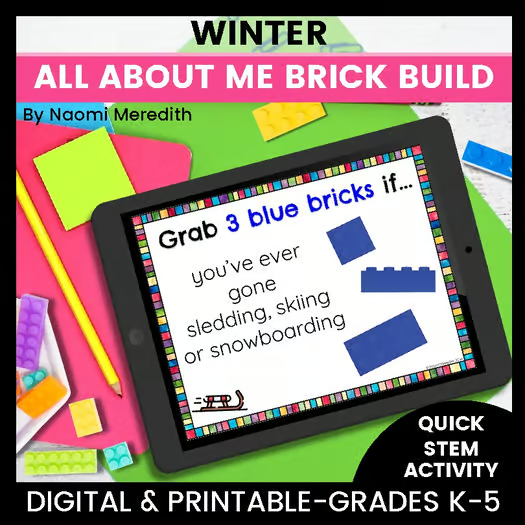
The first day back from winter break can be a lot—excited kids, big feelings, nonstop stories, and very little stamina for long instructions. If you teach STEM (or any special area), you may also see every class in the building that day, which makes planning even trickier.

That’s why I rely on this no-prep, whole-group winter STEM activity every single year with my K–5 STEM classes.

It’s hands-on, quick to explain, and gets every student involved—without worksheets, devices, or complicated setup.

The No-Prep First Day Back from Winter Break Activities

On the first day back, I project a set of winter-themed questions on the board.

Here’s how it works:

  • I read each question out loud

  • If the statement is true for the student, they grab the matching LEGO® brick

  • If it’s not true, they simply sit and wait for the next question

  • We repeat this for each question

That’s it. No directions overload. No worksheets. Just instant engagement.

How I Differentiate for K–5

One thing I love about this activity is how easy it is to differentiate without extra planning:

  • First set of questions: Perfect for all grade levels (K–5)

  • Second set of questions: Designed for grades 3–5

I run the activity whole-group with younger grades, then extend it with the older students. Everyone feels successful, and I don’t have to prep multiple lessons for the same day.

Why This Works So Well on the First Day Back

This activity checks so many boxes for January:

  • ✅ Low pressure – Students can participate without speaking

  • ✅ Hands-on – LEGO bricks keep hands busy and focused

  • ✅ Community-building – Kids naturally start talking about their break

  • ✅ All voices are included – Even quiet students can participate

  • ✅ No prep – Just project and go

It’s the perfect balance between easing students back into routines while still keeping things fun and meaningful.

Grab the Winter All About Me Brick Build

If you want to use this exact activity with your students, you can grab it from my TpT Shop, Naomi Meredith, HERE

Related Podcast Episodes/Blog Posts:

More About The Author, Naomi Meredith

Naomi Meredith is a K-5 STEM educator and business owner in Colorado supporting elementary teachers world-wide navigate the best practices, strategies and tools out there. With over a decade of experience teaching, 5 years teaching elementary STEM, along with a M.Ed. in STEM Leadership and STEM Certificate, Naomi helps teachers world-wide to navigate best practices, strategies and tools out there.

She offers a variety of tools to help teachers feel successful teaching STEM to their elementary students through lesson plans, online courses, coaching and speaking events.

She truly believes that any teacher out there can learn how to use STEM, innovation and hands-on learning in their classrooms effectively. She can’t wait to connect with you and be your guide!

Connect with Naomi Meredith:

Easy Pumpkin Patch Craft Ideas

Easy Pumpkin Patch Craft Ideas

Learn where pumpkins grow and create a pumpkin patch with vines for a pumpkin to roll through.

Materials Needed for this Paper Plate Roller Coaster Project:

Some items are linked to my Amazon Affiliate account. When you purchase through my link, there is no added cost to you, but I receive a small commission in return.

Watch the video on how to make this Easy Pumpkin Patch Craft Ideas


Let’s slow it down with step-by-step directions on how to make this easy pumpkin patch craft ideas.

Step 1:

Color and cut the pumpkin patch images.

Step 2:

Cut the green paper into 1-inch strips

Step 3:

Using one paper at a time, glue one end of a paper strip to the plate. Make a loop, curl, or other shape with the paper strip, to make a vine. Glue down the other end of the strip.

Step 4:

Continue to add more paper strips on the plate to create the pumpkin patch maze.

Step 5:

Glue the pumpkin images to the pumpkin patch maze.

Tip: Want the pumpkins to stand up? Cut a small square of cardboard and fold in half to make an “L” shape. Glue the pumpkin to one side of the cardboard, and the other side of the cardboard onto the plate to make the pumpkin stand.

Step 6:

When finished, tilt the plate to roll the pom pom, which represents a pumpkin, through the vines.

\


Want the templates seen here? You can grab them here in my TpT shop!

If you are looking for…

  • A Low-prep STEM lesson & easy-to-find materials
  • An engaging, hands-on activity that has guided directions
  • Opportunities for students to add their creativity
  • A quick, one-day STEM lesson for after-school clubs, homework extensions, station rotation (and more!)

Then this lesson is PERFECT FOR YOU!


This product includes:

  • Easy project with simple materials
  • Digital & Printable
  • Written & video directions
  • Content-specific vocabulary
  • Science behind the project
  • Resources to explore the topic more
  • Experiment to test the design


Grab the full lesson HERE!


Related Podcast Episodes/Blog Posts:


More About The Author, Naomi Meredith

Naomi Meredith is a K-5 STEM educator and business owner in Colorado supporting elementary teachers world-wide navigate the best practices, strategies and tools out there. With over a decade of experience teaching, 5 years teaching elementary STEM, along with a M.Ed. in STEM Leadership and STEM Certificate, Naomi helps teachers world-wide to navigate best practices, strategies and tools out there.

She offers a variety of tools to help teachers feel successful teaching STEM to their elementary students through lesson plans, online courses, coaching and speaking events.

She truly believes that any teacher out there can learn how to use STEM, innovation and hands-on learning in their classrooms effectively. She can’t wait to connect with you and be your guide!

Connect with Naomi Meredith:


Elementary Lesson Plans to Teach Each Letter of STEM in a Week

If you wanted to dedicate a week to teaching students what each letter of STEM was, where do you even begin? You want the lessons to be simple enough to last for one class session, but still engaging.

I’ve put together tried and true lessons that work well during the Back to School Season where you can teach each letter of STEM in a Week! All of these lessons and resources can be found here in my TpT shop, and also linked in this post.


To make navigating this week of STEM easier, grab THIS free printable PDF that has all of the lessons linked below on one easy-to-read sheet!


Some items are linked to my Amazon Affiliate account. When you purchase through my link, there is no added cost to you, but I receive a small commission in return.

Day 1: STEM Overview

Grades K-2

  1. Watch video “What is STEM”
  2. Go over STEM Classroom Rules & Behavior Blast Off Class Game
  3. Play All About Me Brick Build (Color Questions Only)

Grades 3-5

  1. Watch video “What is STEM”
  2. Go over STEM Classroom Rules & Behavior Blast Off Class Game
  3. Play All About Me Brick Build (Color & Size Questions)

What is STEM?

 .  

Day 2: Science

Grades K-2

  1. Watch video “What is Science?”
  2. Color and cut out the ‘Science’ page from these STEM Posters to start creating a STEM book. If finished early, draw on the back your favorite things about science
  3. Read the story “The Adventures of Beekle: The Unimaginary Friend” by Dan Santat, and complete this STEM & Stories activity 
  4. If you need an additional activity, students can use this Science-themed Engineer Inspiration Board to build what is shown using any items you have on hand (blocks, LEGO bricks, simple Makerspace materials…)

Grades 3-5

  1. Watch video “What is Science?”
  2. Students can fill out the printed or digital version of these STEM Get to Know You Slides of what their favorite things in science are
  3. Complete this fun Cardboard Straw Maze activity with reflection questions and additional tests to extend the lesson

What is Science?


Day 3: Technology

Grades K-2

  1. Watch video “What is Technology?”
  2. Color and cut out the ‘Technology’ page from these STEM Posters to start creating a STEM book. If finished early, draw on the back your favorite things about technology
  3. Read the story “Tek, The Modern Cave Boy” by Patrick McDonnell 
  4. If you need an additional activity, students can use this Technology-themed Engineer Inspiration Board to build what is shown using any items you have on hand (blocks, LEGO bricks, simple Makerspace materials…)

Grades 3-5

  1. Watch video “What is Technology?”
  2. Students can fill out the printed or digital version of these STEM Get to Know You Slides of what their favorite things in technology are
  3. Complete all or a few pages of the Apps About Me activity. This can be assigned digitally or printed. If assigned digitally, it really works on basic computer skills in Google Slides/Power Point/Seesaw. No coding skills required. However, the printable version is still fun!

What is Technology?


Day 4: Engineering

Grades K-2

  1. Watch video “What is Engineering?”
  2. Color and cut out the ‘Engineering’ page from these STEM Posters to start creating a STEM book. If finished early, draw on the back your favorite things about engineering.
  3. Read the story “Rosie Revere, Engineer” by Andrea Beatty and complete this STEM & Stories activity
  4. If you need an additional activity, students can use this Back to School-themed Engineer Inspiration Board to build what is shown using any items you have on hand (blocks, LEGO bricks, simple Makerspace materials…)

Grades 3-5

  1. Watch video “What is Engineering?”
  2. Students can fill out the printed or digital version of these STEM Get to Know You Slides of what their favorite things in technology are
  3. Complete this fun Marble Maze Roller Coaster activity with reflection questions and additional tests to extend the lesson

What is Engineering?

Day 5: Math

Grades K-2

  1. Watch video “What is Math?”
  2. Color and cut out the ‘Math’ page from these STEM Posters to start creating a STEM book. If finished early, draw on the back your favorite things about math.
  3. Read the story “There was an Old Lady Who Swallowed Some Books” by Lucille Colandro  and complete this STEM & Stories activity
  4. If you need an additional activity, students can use this Alphabet Cube station, where students can build each letter of the alphabet or even their name, then count and write how many cubes they used

Grades 3-5

  1. Watch video “What is Math?”
  2. Students can fill out the printed or digital version of these STEM Get to Know You Slides of what their favorite things in math are
  3. Complete this fun Boat Float activity with reflection questions and additional tests to extend the lesson. I recommend having smaller buckets of water already filled so students can test your designs. This is a great outside activity too if that works for where you are at!

What is Math?


Don’t forget to download your FREE PDF here that has an easy to read outline of all of these lessons so you can keep track throughout the week!


Related Podcast Episodes/Blog Posts:

More About The Author, Naomi Meredith

Naomi Meredith is a K-5 STEM educator and business owner in Colorado supporting elementary teachers world-wide navigate the best practices, strategies and tools out there. She has over a decade of experience teaching, 5 years teaching elementary STEM, along with a M.Ed. in STEM Leadership and STEM Certificate.

She offers a variety of resources to help teachers feel successful teaching STEM to their elementary students through lesson plans, online courses, coaching and speaking events.

She truly believes that any teacher out there can learn how to use STEM, innovation and hands-on learning in their classrooms effectively. She can’t wait to connect with you and be your guide!

Connect with Naomi Meredith:

What Should a Word Wall Look Like in a STEM Classroom? [Back to School STEM Tips Series] [ep.201]

What Should a Word Wall Look Like in a STEM Classroom? [Back to School STEM Tips Series] [ep.201]

Check out the full episode on what should a word wall look like in a STEM classroom:  


Subscribe to the podcast HERE on your favorite podcasting platform.

Have a STEM question? Leave a voice message for the podcast!

Watch the video version of this episode on YouTube here:

Coming soon!

Episode Summary

As you are setting up your STEM classroom, what are things you can decorate with but still connect with what you are teaching? A word wall, or vocabulary wall, can be a great asset to your units to help students make connections across content themes. I’ll be sharing practical ways you can set up a word wall that you can use throughout the school year and with all grade levels, K-5.

Resources Mentioned:

Episode Transcript: 

(0:00) Welcome to the Elementary STEM Coach Podcast. I’m your host, Naomi Meredith, a former classroom (0:06) teacher turned K-5 STEM teacher and coach. With over a decade of experience teaching and a master’s (0:12) degree in STEM leadership, I’m here to coach you throughout the year to help you gain back (0:16) more time to create innovative experiences for your students.

When you are setting up your STEM (0:22) classroom for back to school, have you thought about adding in a word wall? If so, where are (0:29) you going to put it? And if you haven’t, how does this even connect to your STEM classroom? And should (0:34) you even have one? Let’s chat about it. With anything that I have set up in my classroom spaces, (0:41) whether it is my STEM trailer that I am putting together or my K-5 STEM classroom, I am very (0:48) purposeful about the things that I hang up on my wall. Yes, I like things to look cute and cohesive (0:55) and go together.

But also, I always want to make sure, are the things that I’m hanging up, (1:00) are they purposeful or helpful for students? Can this be something that is a good teaching point (1:06) for them? And every single thing that I’ve hung up has a dual purpose. So of course, like I said, (1:12) it might look cute, but also there is a purpose behind it. One thing that can be really helpful (1:18) in your classroom is having your own type of word wall.

And you can do this a couple of ways. One (1:25) way you could do this is you can have an alphabet that you hang up all year long, and each letter (1:31) on the alphabet has a different STEM connection. For example, Y could be for YouTube, S could be (1:38) for file, like a digital file, and so on.

And it helps kids think about the world in a different (1:44) way and with the alphabet. I have a few different options and different colors of this you could (1:49) print and hang up in your space. That’s super easy.

It has a really cute update. So I’m excited to (1:56) choose what color scheme I want to hang up in my STEM trailer. So stay tuned for that.

And another (2:02) way that I have done this as well is you have the alphabet, you hang this up, but also leave space (2:08) underneath each letter. And this is something that you can add to all year long, or you could (2:16) just do this for every unit. Now when you’re teaching K through 5 STEM, that’s six different (2:22) classes, some of you even teach pre-K in there, and all the way up to eighth grade.

So it really (2:28) depends on how you want to do this. Like I said, you could change it out every unit. And if you’re (2:32) teaching in cohesive themes, there is going to be some overlap with how you’re going to use this (2:37) alphabet slash word wall.

So for every unit, you probably have some key vocabulary and concepts (2:44) that you want kids to know about. For example, if you’re teaching your second graders about erosion, (2:50) you probably want the kids to know what the word erosion means while they are creating an invention (2:56) that will help slow down or stop erosion. So with all of those units that go together, (3:02) you can print out that vocabulary that is content specific for that unit.

And then you can add that (3:10) to your word wall. So it makes it very interactive if you are changing it out where the alphabet (3:16) letters can always stay there. But then you are changing out the words.

And you might say, well, (3:22) all of the words are going to be mixed up. Do I have to change it out for have a separate word (3:27) wall for every single grade? You could. But like I said, if you’re teaching in units, everything can (3:33) kind of go together.

And the kids can actually start seeing those connections. So what’s really (3:37) cool when I have done this is the kids will see the words and the vocabulary where has the pictures, (3:43) the word and the definition with them, which all of my lessons that are in my K-5 STEM year-long (3:50) plan, any of those by separately or in the plan, I have all the vocabulary out there for you. So (3:56) you could print them at various sizes.

But what’s really cool when you have all of these words (4:01) hanging up for the unit, the kids might remember what they learned the past year and get really (4:07) excited about it. Like, oh, yeah, I remember that. And that can actually help me with this project.

(4:12) Or even kids who haven’t seen those projects where they weren’t there the year before or (4:17) they are younger, they might get excited and ask more questions. Oh, what does this word mean? (4:21) So having that interactive word wall with your alphabet can really build those connections (4:29) and also help them see that content in a different way. So you might be teaching those (4:35) same standards they’re learning in class, but you are giving it that STEM twist.

So as you are (4:41) setting up your classroom, think about how you can integrate a STEM alphabet and quite possibly (4:48) make it a word wall. And that could be a really cool thing to add into your instruction and (4:53) continue to build up that science vocabulary for your students. If you’re interested in the alphabet (4:59) that I use and hang up in my STEM spaces, you can grab that in my TPT shop, Teachers Pay Teachers (5:05) shop, Naomi Meredith, and you can print the color options I have for you.

Or there’s a version where (5:10) you can just print your own color version to make it match your classroom theme. Thank you so much (5:16) for listening to today’s episode of the elementary STEM coach podcast. I would love to connect with (5:21) you over on Instagram at Naomi Meredith underscore, or send me an email to elementary STEM coach (5:27) podcast at gmail.com. Also, make sure to check out my website, Naomi Meredith.com to see all (5:33) the show notes from today’s episode and shop my K through five STEM resources.

Any questions you (5:38) have needs for resources or ideas for episodes, get in touch. I’ll talk to you soon.

Watch this video to see how I set up my vocabulary wall:

Grab the STEM Alphabet featured in the video here


Related Episodes/Blog Posts:


Connect with Naomi Meredith:


More About your host, Naomi Meredith

Naomi Meredith is a K-5 STEM educator and business owner in Colorado supporting elementary teachers world-wide navigate the best practices, strategies and tools out there. She has over a decade of experience teaching, 5 years teaching elementary STEM, along with a M.Ed. in STEM Leadership and STEM Certificate.

She offers a variety of resources to help teachers feel successful teaching STEM to their elementary students through lesson plans, online courses, coaching and speaking events.

She truly believes that any teacher out there can learn how to use STEM, innovation and hands-on learning in their classrooms effectively. She can’t wait to connect with you and be your guide!

More About The Elementary STEM Coach Podcast

Are you tired of scrolling online for your next great STEM lesson? Do you feel like there is no time to plan, research and test meaningful STEM lessons, so you throw together a hands-on activity and hope that it works? What systems and routines should you set in place to help students be creative, critically think, and collaborate? 

The Elementary STEM Coach is a podcast for K-5 STEM teachers, classroom teachers, GT specialists, and homeschool parents looking for actionable STEM solutions. Each week, Naomi Meredith will share tools, resources and lesson ideas that are actionable in your classroom and create highly engaging experiences with your students. You’ll learn systems and routines that will create control in the chaos and that will keep you organized all year long. 

Your mindless scrolling days are over! Your new STEM-best friend is now here in your ear buds!

Moon Phases STEM Project

Moon Phases STEM Project

Learn more about how moon phases work with this orbit activity. Create a model to demonstrate how the moon orbits Earth and where it’s located for each moon phase using these templates and worksheets to guide the activity. 

Materials Needed for this Moon Phases STEM Project:

Some items are linked to my Amazon Affiliate account. When you purchase through my link, there is no added cost to you, but I receive a small commission in return.

Watch the video on how to make this Moon Phases STEM Project


Let’s slow it down with step-by-step directions on how to make this easy moon phases STEM Project for kids.

Step 1:

1. [Ask a grown-up to help] Using the thumbtack, carefully punch a hole in the middle of each paper plate.

Tip: If you don’t have two different-sized paper plates, trace and cut out a big and small circle on thin cardboard.

Step 2:

Stack the plates with the smallest on top, and poke the brad fastener through the holes to secure

Step 3:

Cut out these Moon Phase images and glue them clockwise around the small plate in order of when they happen.

Step 4:

Using the air-dry clay, create an Earth and Moon model. Use the markers to color the clay while it’s wet or dry (both will work!)

Tip: Don’t have clay? Use these printable templates instead. 

Step 5:

When the clay dries, tape or glue the Earth in the center of the small plate. Attach the Moon to the edge of the large plate. Draw an arrow next to the Moon pointing counterclockwise. 

Step 6:

Rotate the outer plate counterclockwise to demonstrate the Moon orbiting the Earth and the sequence of moon phases throughout the month. Use this model to help you make observations at night and see which of the Moon Phases is happening. Draw your observations on this worksheet. 


Want the templates seen here? You can grab them here in my TpT shop!
If you are looking for…

  • A Low-prep STEM lesson & easy-to-find materials
  • An engaging, hands-on activity that has guided directions
  • Opportunities for students to add their creativity
  • A quick, one-day STEM lesson for after-school clubs, homework extensions, homeschool projects (and more!)

Then this resource is PERFECT FOR YOU!


This product includes:

  • Easy project with simple materials
  • Digital & Printable
  • Written & video directions
  • Content-specific vocabulary
  • Science behind the project
  • Resources to explore the topic more
  • Experiment to test the design


Grab the full lesson HERE!

Related Podcast Episodes/Blog Posts:

More About The Author, Naomi Meredith

Naomi Meredith is a K-5 STEM educator and business owner in Colorado supporting elementary teachers world-wide navigate the best practices, strategies and tools out there. She has over a decade of experience teaching, 5 years teaching elementary STEM, along with a M.Ed. in STEM Leadership and STEM Certificate.

She offers a variety of resources to help teachers feel successful teaching STEM to their elementary students through lesson plans, online courses, coaching and speaking events.

She truly believes that any teacher out there can learn how to use STEM, innovation and hands-on learning in their classrooms effectively. She can’t wait to connect with you and be your guide!

Connect with Naomi Meredith: